Safety & Privacy Checklist
Quick Answer
Treat accounts as high-value, never share identifying personal information in chat, use strong unique credentials with 2FA where available, control what is visible and audible if you appear on camera, and be extremely cautious about moving communication or payments off-platform.
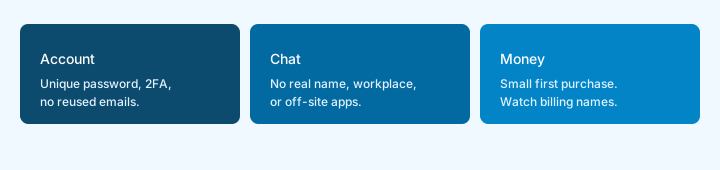
The short list
- Most high-impact risks are reduced by a small set of consistent habits.
- Viewers and performers face overlapping but distinct risk profiles.
- No platform can eliminate all risk; controllable practices still matter a great deal.
- Off-platform communication and payment requests are recurring high-risk patterns.
Why This Checklist Exists
Amateur webcam platforms combine real-time video, payment credentials, chat, and often personal devices. This combination creates exposure that is easy to underestimate, especially for people approaching the platforms casually. The checklist focuses on the highest-impact actions rather than exhaustive edge cases.
For Viewers
- Use a unique, strong password (or passphrase) and enable two-factor authentication whenever the platform offers it.
- Do not reuse the same password you use for email, banking, or other high-value accounts.
- Avoid sharing real name, workplace, city, school, social profiles, or phone numbers in chat.
- Be cautious of requests to move conversation to external messaging apps, email, or phone. This is a common social-engineering pattern.
- Prefer official platform payment systems. Requests for direct payment methods, gift cards, or cryptocurrency transfers outside the platform should be treated with high skepticism.
- Review payment method statements periodically. Use cards or methods you can monitor and dispute if necessary.
- Log out of shared devices and clear sessions when finished. Do not leave accounts open on computers or phones that others can access.
- Assume public chat is public. Anything typed in a public room can be seen by others present.
For Performers
- Control what appears in frame and what can be heard in the background before going live. Windows, documents, landmarks, mail, and ambient conversations can reveal location or identity.
- Consider separate devices or profiles for work activity when practical. Mixing personal and work accounts increases correlation risk.
- Understand the platform’s content retention and takedown policies. Know what is recorded, how long it is kept, and how to request removal.
- Be deliberate about revealing location-identifying details in video, audio, or chat.
- Keep personal and work financial accounts appropriately separated where possible.
- Document platform rules and your own boundaries clearly. Consistency reduces ambiguity for both you and viewers.
- Treat requests for personal contact, meetings, or off-platform payment with caution. These are common vectors for harassment or fraud.
Account & Device Hygiene (Both Roles)
- Enable 2FA on email accounts used for platform recovery.
- Keep operating systems and browsers updated.
- Be careful with browser extensions; some can inject scripts or read page content.
- On shared networks, consider whether traffic or device visibility matters for your threat model.
Common Mistakes
- Mistake: Treating public chat as private.
- Mistake: Reusing passwords or skipping 2FA on accounts that hold payment methods.
- Mistake: Assuming all platforms enforce rules the same way.
- Mistake: Sharing personal contact information early or under social pressure.
- Mistake: Believing that “the platform is completely anonymous” or that residual risk is zero.
When Something Goes Wrong
If you believe an account has been compromised, change the password immediately, enable or re-check 2FA, review recent activity and payment methods, and contact the platform’s official support through the website (not through unsolicited messages). For serious harassment or threats, document evidence and consider appropriate reporting channels in your jurisdiction.
Sources
Rules and prices change. Confirm on the live site. Public documents used here:
- Chaturbate: How do I buy tokens?
- Chaturbate: How do I convert my tokens? (published $0.05/token conversion on that page when checked)
- 18 U.S.C. § 2257
- 28 C.F.R. Part 75
Related Reading
- Safety & Privacy Hub
- Account Security Basics
- Common Scams Targeting Viewers and Performers
- Device and Location Privacy
- Are amateur webcam sites safe?
- Can performers see my IP address or location?
- Getting Started Guide
Last Updated: 2026-08-05 · Author: Editorial Team · Estimated Reading Time: 8–10 min